
Why Google Search Console Is Essential After Migration
Google Search Console after migration: Why daily monitoring in the first 4 weeks prevents ranking losses and which errors you must fix immediately.

Richard Roth
SEO & GEO Strategist
July 8, 2026
12 min read

Google Search Console is your most important tool after a website migration to monitor the visibility of your new URLs and detect ranking losses early. Anyone who doesn’t check GSC daily after a relaunch or domain change risks that crawling errors, faulty redirects, or blocked pages remain unnoticed for weeks.
This is exactly why the question “why Google Search Console after migration” concerns so many webmasters. GSC delivers the only direct signals from Google itself about how the new site structure is perceived. Without this data, you’re groping in the dark.
- • Daily monitoring required In the first 4 weeks, you only detect critical errors through daily GSC monitoring.
- • Plan for data delay GSC data appears only after 48 to 72 hours, Screaming Frog closes this gap.
- • Baseline before go-live Export at least 16 months of historical data for reliable benchmarking after relaunch.
- • Warning signals from week 4 Persistent traffic drops over 30 to 40% indicate technical errors.
- • Use change of address The GSC tool transfers ranking signals during domain changes and accelerates reindexing.
Why is Google Search Console so important after a migration?
Google Search Console is the first tool after a migration that shows whether Google even finds and indexes your new URLs. The index coverage report lists all pages that Google has crawled, marking errors, warnings, and excluded URLs.
Anyone who checks this report daily immediately recognizes when important product pages or categories are not being indexed.
The following reports are particularly relevant in the first weeks after relaunch:
Index Coverage Report: Shows which URLs are indexed, which have errors, and which Google actively excludes. This is where 404 errors, soft 404 pages, and blocked resources appear. This report is your early warning system for indexing problems.
Performance Report: Delivers clicks, impressions, and average positions for all indexed pages. Ranking changes after migration become visible here. You see at a glance which pages are losing traffic and which are gaining.
Sitemaps: After relaunch, the new XML sitemap must be submitted. Only directly indexable URLs should be included to avoid conflicting signals. A clean sitemap significantly accelerates reindexing.
URL Inspection Tool: Enables manual checking of individual URLs for crawling status, indexing status, and potential blocks. If an important page isn’t being indexed, you’ll find the cause here.
An often underestimated point: GSC data doesn’t appear in real time. The data delay is typically 48 to 72 hours. This means that errors occurring directly after go-live only become visible in GSC two to three days later.
Export a complete dataset from the Performance Report before migration. At least 16 months of historical data is recommended as a benchmark so you can clearly recognize deviations after relaunch.

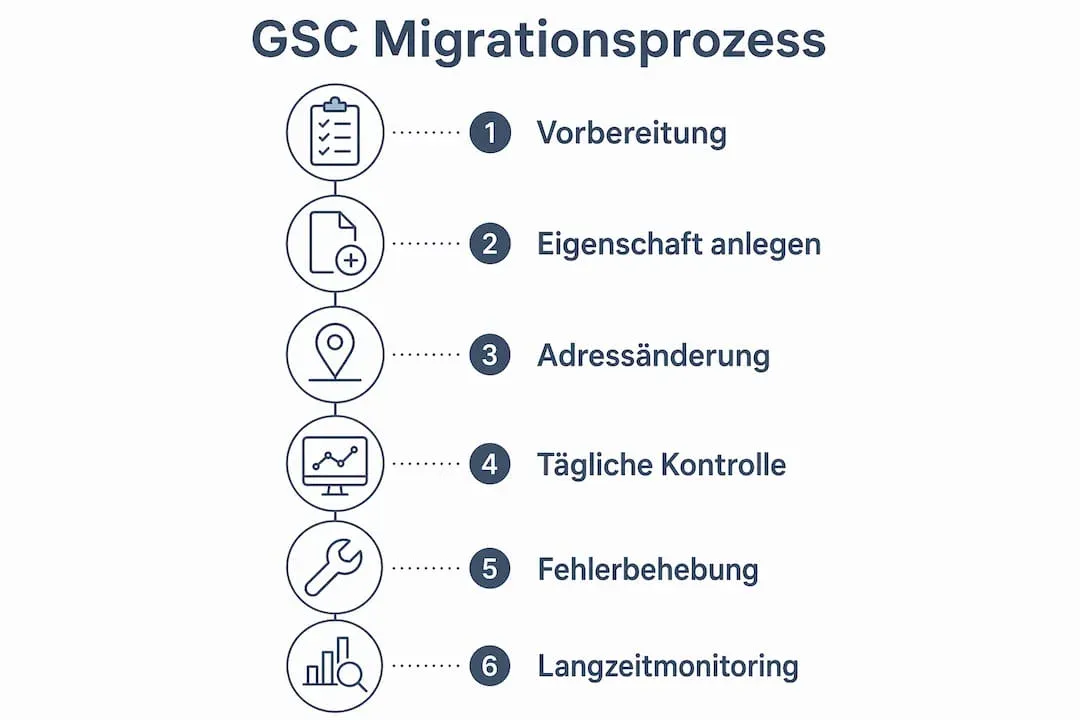
The 48 to 72 hour data delay is the detail that catches people out, because the first two days after go-live are exactly when the worst redirect and indexing errors surface. That’s why I never rely on GSC alone for the launch window and run a Screaming Frog crawl in parallel to see 404s and canonical issues in real time. One habit that pays off later: export at least 16 months of Performance data before you migrate, so a drop in week six can be measured against a real baseline instead of a guess.
Which errors appear in Google Search Console after the move?
Crawling errors are the most common cause of ranking losses after a migration. They don’t always arise from poor preparation, but often from small technical details overlooked in the stress of go-live.
The typical error patterns in GSC after a migration:
404 Errors: Old URLs for which no redirect was set up return a 404 status. Google loses the connection to the old page and devalues built-up link strength. Every 404 error is lost ranking potential.
5xx Server Errors: Occur frequently when the new server collapses under load or configuration errors exist. They signal to Google that the page is unreachable. Repeated 5xx errors can cause Google to reduce crawling.
Faulty Redirects: Redirect chains, where URL A redirects to URL B to URL C, slow down crawling and can cause Google to incorrectly evaluate the target URL. A clean redirect map during migration is therefore mandatory.
Incorrect or outdated sitemaps: Uncleaned sitemaps with old URLs send conflicting signals and significantly delay reindexing. Google then crawls URLs that no longer exist instead of focusing on the new ones.
Canonical Errors: Incorrectly set canonical tags can cause Google to consider the wrong version of a page as authoritative. This is a particularly common problem during platform changes. A canonical tag tells Google which URL is the “main version” when multiple similar pages exist.
Warnings in GSC should not immediately lead to hectic changes. Systematic root cause analysis is the key to sustainable problem solving. Anyone who immediately changes redirects or resubmits sitemaps at every crawling notice can cause more damage than they fix.
Create a custom report in GSC that shows only pages with error status. This way you see at a glance every day whether new problems have arisen, without manually searching through the entire index coverage report.
Is Google Search Console alone sufficient for monitoring?
GSC is indispensable, but not a complete monitoring system. The data delay of 48 to 72 hours makes it blind for the critical first hours after go-live.
Most serious errors occur precisely in this time window.
Proven supplements to GSC after a migration:
Screaming Frog SEO Spider: Performs live crawls of the new domain and immediately shows which URLs deliver 404 errors, which redirects are faulty, and where canonical tags are missing. No waiting for GSC data. Screaming Frog is like an X-ray machine for your website that works in real time.
Screaming Frog Log File Analyser: Evaluates server logs and shows which URLs Googlebot actually crawled and how often. This uncovers crawling inefficiencies not directly visible in GSC. You see whether Google is concentrating its crawling resources on the right pages.
Core Web Vitals Monitoring: GSC shows Core Web Vitals data, but with delay. Tools like PageSpeed Insights or Chrome User Experience Report deliver faster feedback on loading times and interactivity after relaunch. Core Web Vitals are Google’s metrics for user experience and directly influence rankings.
Google Analytics 4: Linking GA4 with GSC enables direct correlation of organic traffic with ranking data. Traffic drops can thus be attributed to a concrete cause more quickly.
GSC alone is not sufficient. Screaming Frog and server log analyses close the gap between go-live and the moment when GSC data becomes available. Anyone who forgoes this combination loses valuable time in troubleshooting.
How do you use Google Search Console practically after migration?
Structured use of GSC doesn’t begin after go-live, but already in preparation. Anyone who sets up the right properties and exports baseline data can compare immediately after relaunch.
Setting up and linking properties
During a domain change, the new domain must be set up as its own property in GSC. There are two types: the domain property, which covers all subdomains and protocols, and the URL prefix property for specific subdirectories.
For most migrations, the domain property is the right choice. It automatically captures all variants of your domain (www, without www, http, https) and significantly simplifies monitoring.
Using the “Change of Address” tool
For complete domain migration, the GSC “Change of Address” tool is mandatory. It officially informs Google about the move and helps transfer ranking signals from the old to the new domain.
Important: The tool only works if both domains are registered as verified properties in GSC. Without this official notification, Google treats the new domain like a completely new website.
Daily monitoring of the most important reports
| Report | Check Frequency | What to Watch |
|---|---|---|
| Index Coverage | Daily | New errors, increase in excluded URLs |
| Performance | Daily | Click and impression declines, position losses |
| Sitemaps | Weekly | Submission status, processing errors |
| Core Web Vitals | Weekly | Deteriorations in LCP, CLS, or INP |
| URL Inspection | As needed | Manually check individual URLs for indexing status |
Benchmarking is crucial here. Anyone who exported at least 16 months of performance data before migration can clearly classify deviations after relaunch.
A 15% decline in week one is possibly normal. The same decline in week six is a warning signal.
Set up email notifications in GSC for critical errors. This way you’re automatically informed when new 404 spikes or indexing problems occur, without having to check manually every day.
For a complete SEO checklist after migration, a structured review of all relevant checkpoints is worthwhile before you consider the relaunch complete.
How long does recovery take after a migration according to GSC data?
The transition phase after a migration is the most nerve-wracking time for many webmasters. Traffic fluctuations of 4 to 8 weeks are normal while Google processes new URLs and 301 redirects.
This is not an error, but a technical process.
| Period After Go-Live | Typical Behavior | Assessment |
|---|---|---|
| Week 1 to 2 | Ranking fluctuations, increased crawling activity | Normal |
| Week 3 to 4 | Stabilization begins, first indexing visible | Normal |
| Week 5 to 8 | Traffic approaches baseline values | Expected |
| From week 4 with strong drops | Persistent losses over 30 to 40% | Warning signal |
Ranking volatility in the first two to three weeks is a known pattern and no reason to panic. Anyone who checks GSC daily during this phase and systematically fixes errors actively supports recovery.
It looks different from week four onward. A drop in organic traffic over 30 to 40% after more than four weeks is a clear warning signal. The most common causes are errors in the redirect map or incorrectly set canonical tags.
Redirects should remain permanently active, not just in the first weeks after relaunch. Google recommends you keep the redirects live for at least 180 days so it has time to fully understand the new URLs and remove the old ones from the index.
Daily GSC review in the first four weeks is the most effective measure to detect critical errors early. After that, weekly monitoring is sufficient for most projects.
What I’ve learned about GSC after over 45 migration projects
I’ve accompanied many migrations in recent years, and one thing strikes me repeatedly: Most problems don’t arise from poor technology, but from poor preparation. Anyone who opens GSC for the first time only after go-live has already lost.
The most common mistake is panic in week one. Ranking fluctuations are normal. Anyone who then starts changing redirects, resubmitting sitemaps, and adjusting canonical tags without knowing the cause creates new problems.
My advice: First analyze, then act. GSC shows you the data, but it doesn’t interpret it for you.
What I’ve also learned: GSC is not a cure-all. It shows what Google sees. But what Googlebot experiences in the first hours after go-live, you only see two days later.
That’s why Screaming Frog is part of every migration setup for me, without exception. Server logs are even more valuable, but are completely ignored by most webmasters.
Clean preparation is the only way to sleep peacefully. A complete redirect map before relaunch, exported baseline data, and a cleaned sitemap are not optional extras. They are the foundation for monitoring to work at all after migration.
Anyone who has done this homework can calmly approach warning messages in GSC and solve them systematically.
 Frequently Asked Questions
 What does Google Search Console show after a migration?
How long do ranking fluctuations last after a migration?
Why doesn't Google Search Console work immediately after the move?
What is the GSC "Change of Address" tool and when do I need it?
Which errors in GSC are most critical after a migration?
You might also like
Volusion Alternatives 2026: Modern, Future-Proof and Conversion-Strong
Volusion alternatives compared: a modern, future-proof system with a strong checkout and active ecosystem instead of an outdated base. With a recommendation.

Etsy Alternatives 2026: Which Platform Fits Your Brand
Etsy alternatives compared: your own store with your own brand and customer data instead of 10-15% fees. Who should switch, with a clear recommendation.
Webflow Alternatives 2026: The Shop Systems Actually Worth It
Webflow alternatives compared: real selling depth with subscriptions and more payment methods, while the strong design and CMS stay. With a recommendation.